CyberDefender PacketDetective Walkthrough
| Category | Tactics | Tool |
|---|---|---|
| Network Forensics | Execution | Wireshark |
| Defense Evasion | ||
| Command and Control |
Overview
In September 2020, your SOC detected suspicious activity from a user device, flagged by unusual SMB protocol usage. Initial analysis indicates a possible compromise of a privileged account and remote access tool usage by an attacker.
Your task is to examine network traffic in the provided PCAP files to identify key indicators of compromise (IOCs) and gain insights into the attacker’s methods, persistence tactics, and goals. Construct a timeline to better understand the progression of the attack by addressing the following questions.
Question 1
The attacker’s activity showed extensive SMB protocol usage, indicating a potential pattern of significant data transfer or file access. What is the total number of bytes of the SMB protocol?
- Open Wireshark and load your capture file (if not already capturing).
- Go to the “Statistics” menu and select “Protocol Hierarchy”.
- Scroll down to find SMB (Server Message Block Protocol) or SMB2.
- The Packet Count for SMB will be displayed in this section.
- Note down the total number of packets used by SMB.

Question 2
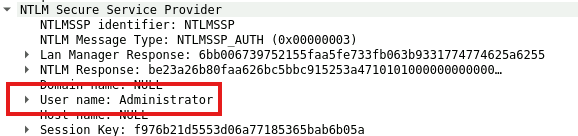
Authentication through SMB was a critical step in gaining access to the targeted system. Identifying the username used for this authentication will help determine if a privileged account was compromised. Which username was utilized for authentication via SMB?
NTLM authentication follows a three-step handshake:
- Type 1 (Negotiate Message): The client requests authentication.
- Type 2 (Challenge Message): The server responds with a challenge.
- Type 3 (Authentication Message): The client sends the username and hashed credentials.
The Type 3 (NTLMSSP_AUTH) message contains the username in plaintext.
- Filter NTLM Traffic
Apply the following filter:
or specifically for authentication messages:
ntlmsspntlmssp.auth - Locate the NTLM Authentication Message
- Look for “NTLMSSP_AUTH (0x00000003)”.
- Expand NTLM Secure Service Provider (NTLMSSP).
- Extract the Username
- Find the “User name” field.
- In our case, it reveals:
Sigma Rule
title: Suspicious Group And Account Reconnaissance Activity Using Net.EXE
id: d95de845-b83c-4a9a-8a6a-4fc802ebf6c0
status: test
description: |
    Detects suspicious reconnaissance command line activity on Windows systems using Net.EXE
    Check if the user that executed the commands is suspicious (e.g. service accounts, LOCAL_SYSTEM)
references:
    - https://redcanary.com/blog/how-one-hospital-thwarted-a-ryuk-ransomware-outbreak/
    - https://thedfirreport.com/2020/10/18/ryuk-in-5-hours/
    - https://research.nccgroup.com/2022/08/19/back-in-black-unlocking-a-lockbit-3-0-ransomware-attack/
author: Florian Roth (Nextron Systems), omkar72, @svch0st, Nasreddine Bencherchali (Nextron Systems)
date: 2019-01-16
modified: 2023-03-02
tags:
    - attack.discovery
    - attack.t1087.001
    - attack.t1087.002
logsource:
    category: process_creation
    product: windows
detection:
    selection_img:
        - Image|endswith:
              - '\net.exe'
              - '\net1.exe'
        - OriginalFileName:
              - 'net.exe'
              - 'net1.exe'
    # Covers group and localgroup flags
    selection_group_root:
        CommandLine|contains:
            - ' group '
            - ' localgroup '
    selection_group_flags:
        CommandLine|contains:
            # Add more groups for other languages
            - 'domain admins'
            - ' administrator' # Typo without an 'S' so we catch both
            - ' administrateur' # Typo without an 'S' so we catch both
            - 'enterprise admins'
            - 'Exchange Trusted Subsystem'
            - 'Remote Desktop Users'
            - 'Utilisateurs du Bureau à distance' # French for "Remote Desktop Users"
            - 'Usuarios de escritorio remoto' # Spanish for "Remote Desktop Users"
            - ' /do' # short for domain
    filter_group_add:
        # This filter is added to avoid the potential case where the point is not recon but addition
        CommandLine|contains: ' /add'
    # Covers 'accounts' flag
    selection_accounts_root:
        CommandLine|contains: ' accounts '
    selection_accounts_flags:
        CommandLine|contains: ' /do' # short for domain
    condition: selection_img and ((all of selection_group_* and not filter_group_add) or all of selection_accounts_*)
falsepositives:
    - Inventory tool runs
    - Administrative activity
level: medium
Question3
During the attack, the adversary accessed certain files. Identifying which files were accessed can reveal the attacker’s intent. What is the name of the file that was opened by the attacker?
In this case, we extracted the File Name: \eventlog from SMB (Server Message Block) traffic in Wireshark. Here’s how this was obtained.
SMB is used to access shared files and directories over a network. In this instance, the file name appears as part of a Create Request or similar operation within SMB. When a client accesses or manipulates a file over an SMB connection, packets often contain metadata, including the requested file path or object.
-
Filter SMB Traffic Apply this filter to isolate SMB packets:
smb || smb2 -
Locate SMB Create Request Packets
- Look for packets labeled “SMB2 Create Request” or “Create” in SMBv1.
- Expand the SMB protocol section in the packet details.
-
Find the “File Name” Field
- Look for a section labeled “File Name” or “Path”.
- In this case, the extracted value is: File Name: \eventlog
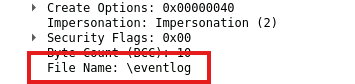
Why This Matters
The packet is attempting to open or access the \eventlog file, likely referring to Windows system event logs. This activity could be:
- Legitimate: A system or user querying logs.
- Suspicious: Possible reconnaissance, log dumping, or tampering.
Sigma Rule
Question 4
Clearing event logs is a common tactic to hide malicious actions and evade detection. Pinpointing the timestamp of this action is essential for building a timeline of the attacker’s behavior. What is the timestamp of the attempt to clear the event log? (24-hour UTC format)
- Filter SMB Traffic
Apply the following filter to isolate SMB protocol activity:
smb || smb2
This helps in identifying SMB-based actions, including file access and remote log clearing.
- Look for Suspicious SMB Commands
- In the Packet List pane, scan for Windows event log operations.
- Specifically, search for ClearEventLogW request, which indicates an attempt to erase logs.
- Inspect the Packet Details
- Click on the packet associated with ClearEventLogW.
- Expand the SMB protocol section to verify the command details.
- Extract the Timestamp
- Locate the Arrival Time field under the Packet Details pane.
- The timestamp of the event log clearing request is:
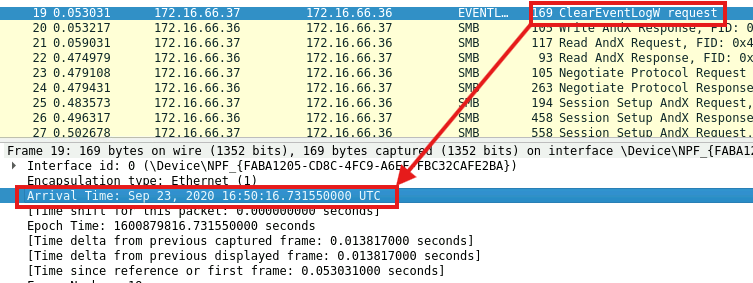
Why This Matters
Clearing event logs is a common technique used by attackers to evade detection after executing malicious actions. Identifying this event allows defenders to:
- Reconstruct the attack timeline.
- Identify compromised accounts or hosts.
- Investigate lateral movement attempts.
Sigma Rule
title: Suspicious Eventlog Clearing or Configuration Change Activity
id: cc36992a-4671-4f21-a91d-6c2b72a2edf5
status: stable
description: |
    Detects the clearing or configuration tampering of EventLog using utilities such as "wevtutil", "powershell" and "wmic".
    This technique were seen used by threat actors and ransomware strains in order to evade defenses.
references:
    - https://github.com/redcanaryco/atomic-red-team/blob/f339e7da7d05f6057fdfcdd3742bfcf365fee2a9/atomics/T1070.001/T1070.001.md
    - https://eqllib.readthedocs.io/en/latest/analytics/5b223758-07d6-4100-9e11-238cfdd0fe97.html
    - https://learn.microsoft.com/en-us/windows-server/administration/windows-commands/wevtutil
    - https://gist.github.com/fovtran/ac0624983c7722e80a8f5a4babb170ee
    - https://jdhnet.wordpress.com/2017/12/19/changing-the-location-of-the-windows-event-logs/
author: Ecco, Daniil Yugoslavskiy, oscd.community, D3F7A5105
date: 2019-09-26
modified: 2023-07-13
tags:
    - attack.defense-evasion
    - attack.t1070.001
    - attack.t1562.002
    - car.2016-04-002
logsource:
    category: process_creation
    product: windows
detection:
    selection_wevtutil:
        Image|endswith: '\wevtutil.exe'
        CommandLine|contains:
            - 'clear-log '          # clears specified log
            - ' cl '                # short version of 'clear-log'
            - 'set-log '            # modifies config of specified log. could be uset to set it to a tiny size
            - ' sl '                # short version of 'set-log'
            - 'lfn:'                # change log file location and name
    selection_other_ps:
        Image|endswith:
            - '\powershell.exe'
            - '\pwsh.exe'
        CommandLine|contains:
            - 'Clear-EventLog '
            - 'Remove-EventLog '
            - 'Limit-EventLog '
            - 'Clear-WinEvent '
    selection_other_wmi:
        Image|endswith:
            - '\powershell.exe'
            - '\pwsh.exe'
            - '\wmic.exe'
        CommandLine|contains: 'ClearEventLog'
    filter_msiexec:
        # Example seen during office update/installation:
        #   ParentImage: C:\Windows\SysWOW64\msiexec.exe
        #   CommandLine: "C:\WINDOWS\system32\wevtutil.exe" sl Microsoft-RMS-MSIPC/Debug /q:true /e:true /l:4 /rt:false
        ParentImage:
            - 'C:\Windows\SysWOW64\msiexec.exe'
            - 'C:\Windows\System32\msiexec.exe'
        CommandLine|contains: ' sl '
    condition: 1 of selection_* and not 1 of filter_*
falsepositives:
    - Admin activity
    - Scripts and administrative tools used in the monitored environment
    - Maintenance activity
level: high
Question 5
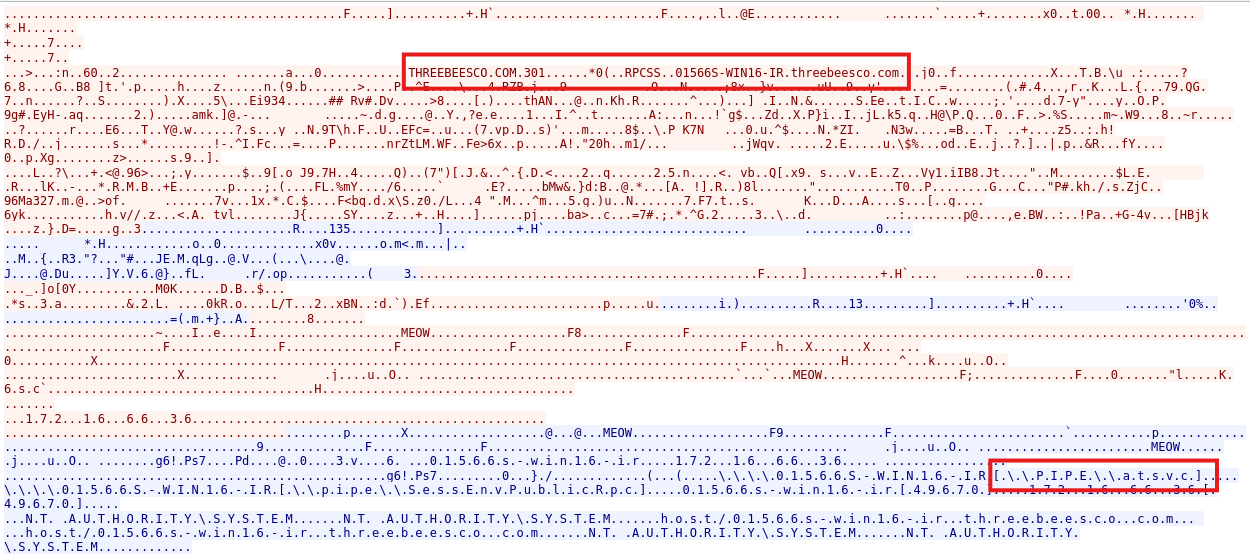
The attacker used “named pipes” for communication, suggesting they may have utilized Remote Procedure Calls (RPC) for lateral movement across the network. RPC allows one program to request services from another remotely, which could grant the attacker unauthorized access or control. What is the name of the service that communicated using this named pipe?
-
Apply Filters to Isolate Suspicious Traffic
- Use the following filters to locate RPC or SMB Named Pipe traffic:
smb || smb2 || dcerpc || netlogon - If searching for Named Pipe communication:
smb2.pipe_name
- Use the following filters to locate RPC or SMB Named Pipe traffic:
-
Follow the TCP Stream to Decode the Data
- Right-click on a packet of interest and select Follow → TCP Stream.
- This reconstructs the communication between client and server.
- Look for human-readable text in the decoded stream.
-
Analyze Extracted Data
- The image shows references to THREEBEESCO.COM, an internal hostname.
- The detected Named Pipe path (
\\.\PIPE\atsvc) suggests scheduled task execution over SMB.
Why This Matters
- Named Pipes (
\\.\PIPE\atsvc): Used for remote scheduled task creation, potentially indicating lateral movement. - RPC Communication (
RPCSS): May involve remote service execution or privilege escalation. - Presence of a Domain Name (
THREEBEESCO.COM): Suggests activity inside a corporate Windows Active Directory network.
Sigma Rule
title: Remote Task Creation via ATSVC Named Pipe
id: f6de6525-4509-495a-8a82-1f8b0ed73a00
description: Detects remote task creation via at.exe or API interacting with ATSVC namedpipe
author: Samir Bousseaden
date: 2019/04/03
references:
    - https://blog.menasec.net/2019/03/threat-hunting-25-scheduled-tasks-for.html
tags:
    - attack.lateral_movement
    - attack.persistence
    - attack.t1053
    - car.2013-05-004
    - car.2015-04-001
logsource:
    product: windows
    service: security
    description: 'The advanced audit policy setting "Object Access > Audit Detailed File Share" must be configured for Success/Failure'
detection:
    selection:
        EventID: 5145
        ShareName: \\*\IPC$
        RelativeTargetName: atsvc
        Accesses: '*WriteData*'
    condition: selection
falsepositives:
    - pentesting
level: medium
Question 6
Measuring the duration of suspicious communication can reveal how long the attacker maintained unauthorized access, providing insights into the scope and persistence of the attack. What was the duration of communication between the identified addresses 172.16.66.1 and 172.16.66.36?
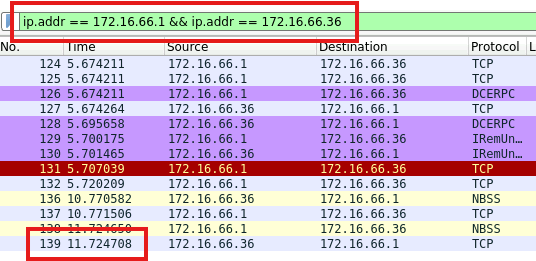
- Filter Applied in Wireshark
ip.addr == 172.16.66.1 && ip.addr == 172.16.66.36
This filter isolates traffic between the two hosts.
- Identify the First and Last Packet
- The first packet was recorded at
5.674211 seconds. - The last packet was recorded at
11.724708 seconds.
- Calculate the Duration
- Subtract the first timestamp from the last to determine how long the session remained active.
Why This Matters
Understanding the duration of unauthorized communication is crucial for:
- Identifying attacker dwell time: Longer sessions may indicate data exfiltration or persistence.
- Assessing impact scope: If sustained, the attacker may have moved laterally or established backdoors.
- Detecting stealth techniques: Short bursts of communication can indicate low-and-slow attacks to avoid detection.
Sigma Rule
None
Question 7
The attacker used a non-standard username to set up requests, indicating an attempt to maintain covert access. Identifying this username is essential for understanding how persistence was established. Which username was used to set up these potentially suspicious requests?
-
Captured SMB Authentication Attempt
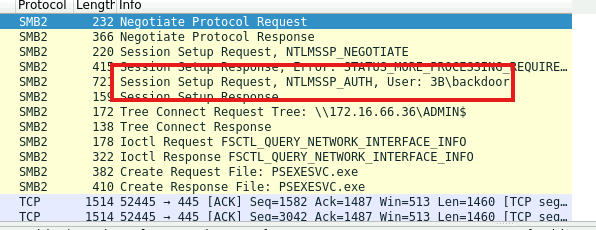
- The Session Setup Request shows NTLMSSP_AUTH, indicating an NTLM authentication attempt.
- The username field reveals
3B\backdoor, which is uncommon and suspicious.
-
Detected in a Lateral Movement Scenario
- The attacker connected to ADMIN$ (
\\172.16.66.36\ADMIN$). - PsExec (
PSEXESVC.exe) execution was also detected, indicating remote command execution.
- The attacker connected to ADMIN$ (
Why This Matters
The presence of a username like backdoor suggests:
- Persistence Mechanism: The attacker likely created this user to retain access.
- Lateral Movement: SMB-based authentication is commonly used in remote execution attacks (PsExec, pass-the-hash, NTLM relays).
- Privilege Escalation: The ADMIN$ share access implies high-privilege operations.
Sigma Rule
title: Suspicious SYSTEM User Process Creation
id: 2617e7ed-adb7-40ba-b0f3-8f9945fe6c09
status: test
description: Detects a suspicious process creation as SYSTEM user (suspicious program or command line parameter)
references:
    - Internal Research
    - https://tools.thehacker.recipes/mimikatz/modules
author: Florian Roth (Nextron Systems), David ANDRE (additional keywords)
date: 2021-12-20
modified: 2024-12-01
tags:
    - attack.credential-access
    - attack.defense-evasion
    - attack.privilege-escalation
    - attack.t1134
    - attack.t1003
    - attack.t1027
logsource:
    category: process_creation
    product: windows
detection:
    selection:
        IntegrityLevel:
            - 'System'
            - 'S-1-16-16384'
        User|contains: # covers many language settings
            - 'AUTHORI'
            - 'AUTORI'
    selection_special:
        - Image|endswith:
              - '\calc.exe'
              - '\cscript.exe'
              - '\forfiles.exe'
              - '\hh.exe'
              - '\mshta.exe'
              - '\ping.exe'
              - '\wscript.exe'
        - CommandLine|contains:
              # - 'sc stop ' # stops a system service # causes FPs
              - ' -NoP '  # Often used in malicious PowerShell commands
              - ' -W Hidden '  # Often used in malicious PowerShell commands
              - ' -decode '  # Used with certutil
              - ' /decode '  # Used with certutil
              - ' /urlcache '  # Used with certutil
              - ' -urlcache '  # Used with certutil
              - ' -e* JAB'  # PowerShell encoded commands
              - ' -e* SUVYI'  # PowerShell encoded commands
              - ' -e* SQBFAFgA'  # PowerShell encoded commands
              - ' -e* aWV4I'  # PowerShell encoded commands
              - ' -e* IAB'  # PowerShell encoded commands
              - ' -e* PAA'  # PowerShell encoded commands
              - ' -e* aQBlAHgA'  # PowerShell encoded commands
              - 'vssadmin delete shadows'  # Ransomware
              - 'reg SAVE HKLM'  # save registry SAM - syskey extraction
              - ' -ma '  # ProcDump
              - 'Microsoft\Windows\CurrentVersion\Run'  # Run key in command line - often in combination with REG ADD
              - '.downloadstring('  # PowerShell download command
              - '.downloadfile('  # PowerShell download command
              - ' /ticket:'  # Rubeus
              - 'dpapi::'     # Mimikatz
              - 'event::clear'        # Mimikatz
              - 'event::drop'     # Mimikatz
              - 'id::modify'      # Mimikatz
              - 'kerberos::'       # Mimikatz
              - 'lsadump::'      # Mimikatz
              - 'misc::'     # Mimikatz
              - 'privilege::'       # Mimikatz
              - 'rpc::'      # Mimikatz
              - 'sekurlsa::'       # Mimikatz
              - 'sid::'        # Mimikatz
              - 'token::'      # Mimikatz
              - 'vault::cred'     # Mimikatz
              - 'vault::list'     # Mimikatz
              - ' p::d '  # Mimikatz
              - ';iex('  # PowerShell IEX
              - 'MiniDump'  # Process dumping method apart from procdump
              - 'net user '
    filter_main_ping:
        CommandLine|contains|all:
            - 'ping'
            - '127.0.0.1'
            - ' -n '
    filter_vs:
        Image|endswith: '\PING.EXE'
        ParentCommandLine|contains: '\DismFoDInstall.cmd'
    filter_config_mgr:
        ParentImage|contains: ':\Packages\Plugins\Microsoft.GuestConfiguration.ConfigurationforWindows\'
    filter_java:
        ParentImage|contains:
            - ':\Program Files (x86)\Java\'
            - ':\Program Files\Java\'
        ParentImage|endswith: '\bin\javaws.exe'
        Image|contains:
            - ':\Program Files (x86)\Java\'
            - ':\Program Files\Java\'
        Image|endswith: '\bin\jp2launcher.exe'
        CommandLine|contains: ' -ma '
    condition: all of selection* and not 1 of filter_*
falsepositives:
    - Administrative activity
    - Scripts and administrative tools used in the monitored environment
    - Monitoring activity
level: high
Question 8
The attacker leveraged a specific executable file to execute processes remotely on the compromised system. Recognizing this file name can assist in pinpointing the tools used in the attack. What is the name of the executable file utilized to execute processes remotely?
-
SMB2 File Creation Requests
- The packet capture shows an SMB “Create Request” and “Create Response” for
PSEXESVC.exe. - This confirms that the attacker transferred and executed the file remotely.
- The packet capture shows an SMB “Create Request” and “Create Response” for
-
Presence in the ADMIN$ Share
- Attackers often drop
PSEXESVC.exeintoADMIN$to gain execution privileges on remote systems. - The request originated from 172.16.66.1, targeting 172.16.66.36, indicating remote execution.
- Attackers often drop

Why This Matters
- PsExec is frequently abused by adversaries for remote command execution and privilege escalation.
- Detection of
PSEXESVC.execreation can indicate lateral movement via SMB. - This technique is part of MITRE ATT&CK T1570 (Lateral Tool Transfer).
Sigma Rule
title: Potential Defense Evasion Via Rename Of Highly Relevant Binaries
id: 0ba1da6d-b6ce-4366-828c-18826c9de23e
related:
    - id: 36480ae1-a1cb-4eaa-a0d6-29801d7e9142
      type: similar
    - id: 2569ed8c-1147-498a-9b8c-2ad3656b10ed # Renamed Rundll32 Specific
      type: derived
    - id: a7a7e0e5-1d57-49df-9c58-9fe5bc0346a2 # Renamed PsExec
      type: obsolete
    - id: d178a2d7-129a-4ba4-8ee6-d6e1fecd5d20 # Renamed PowerShell
      type: obsolete
    - id: d4d2574f-ac17-4d9e-b986-aeeae0dc8fe2 # Renamed Rundll32
      type: obsolete
status: test
description: Detects the execution of a renamed binary often used by attackers or malware leveraging new Sysmon OriginalFileName datapoint.
references:
    - https://mgreen27.github.io/posts/2019/05/12/BinaryRename.html
    - https://mgreen27.github.io/posts/2019/05/29/BinaryRename2.html
    - https://www.trendmicro.com/vinfo/hk-en/security/news/cybercrime-and-digital-threats/megacortex-ransomware-spotted-attacking-enterprise-networks
    - https://twitter.com/christophetd/status/1164506034720952320
    - https://threatresearch.ext.hp.com/svcready-a-new-loader-reveals-itself/
author: Matthew Green - @mgreen27, Florian Roth (Nextron Systems), frack113
date: 2019-06-15
modified: 2024-12-03
tags:
    - attack.defense-evasion
    - attack.t1036.003
    - car.2013-05-009
logsource:
    category: process_creation
    product: windows
detection:
    selection:
        - Description: 'Execute processes remotely'
        - Product: 'Sysinternals PsExec'
        - Description|startswith:
              - 'Windows PowerShell'
              - 'pwsh'
        - OriginalFileName:
              - 'certutil.exe'
              - 'cmstp.exe'
              - 'cscript.exe'
              - 'IE4UINIT.EXE'
              - 'mshta.exe'
              - 'msiexec.exe'
              - 'msxsl.exe'
              - 'powershell_ise.exe'
              - 'powershell.exe'
              - 'psexec.c'        # old versions of psexec (2016 seen)
              - 'psexec.exe'
              - 'psexesvc.exe'
              - 'pwsh.dll'
              - 'reg.exe'
              - 'regsvr32.exe'
              - 'rundll32.exe'
              - 'WerMgr'
              - 'wmic.exe'
              - 'wscript.exe'
    filter:
        Image|endswith:
            - '\certutil.exe'
            - '\cmstp.exe'
            - '\cscript.exe'
            - '\ie4uinit.exe'
            - '\mshta.exe'
            - '\msiexec.exe'
            - '\msxsl.exe'
            - '\powershell_ise.exe'
            - '\powershell.exe'
            - '\psexec.exe'
            - '\psexec64.exe'
            - '\PSEXESVC.exe'
            - '\pwsh.exe'
            - '\reg.exe'
            - '\regsvr32.exe'
            - '\rundll32.exe'
            - '\wermgr.exe'
            - '\wmic.exe'
            - '\wscript.exe'
    condition: selection and not filter
falsepositives:
    - Custom applications use renamed binaries adding slight change to binary name. Typically this is easy to spot and add to whitelist
    - PsExec installed via Windows Store doesn't contain original filename field (False negative)
level: high
Conclusion
Packet analysis is a vital skill for both defenders and attackers.
For defenders, it enables threat detection, anomaly identification, and incident response. For attackers, it aids in network reconnaissance, credential theft, and stealthy persistence.
Mastering packet analysis provides a dual advantage—understanding how attacks happen and how to stop them. Those skilled in it are invaluable in cyber defense, red teaming, and threat hunting. ���������������������������������