Overview
Bazaar Abuse: Bazaar
Name: RBL-Credit-Card.apk
Hashes:
- MD5: 796e3e2ffb1dc14d82cea32c96836f0a
- SHA256: 4658701ff70f59e66d4ece09e938afdecb0c380d00b20cae061ed2753b04cc8a
VirusTotal Analysis
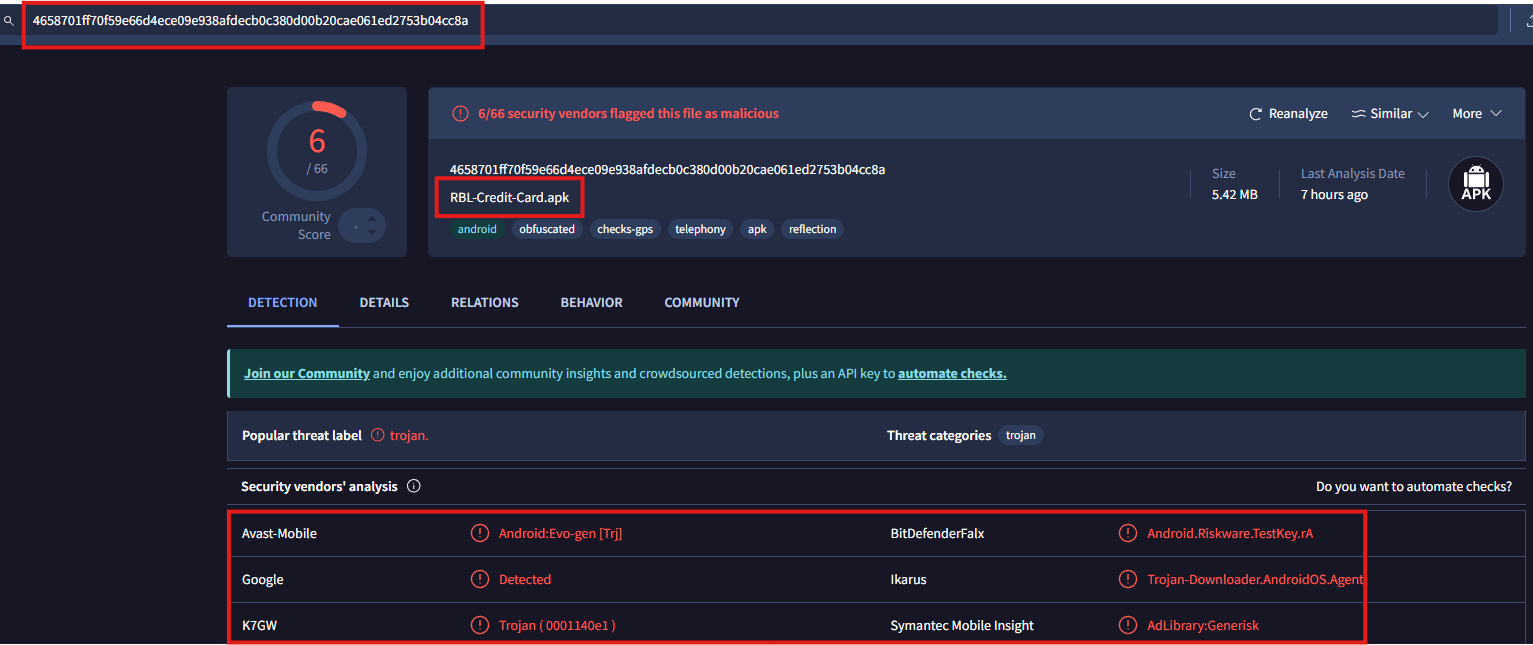
From initial analysis of the image, we can identify a VirusTotal scan of a suspicious APK targeting RBL Bank customers that seems to be red flags against only 6 out of 66 security vendors. This low detection rate, combined with the file name “RBL-Credit-Card.apk” and a size of 5.42 MB, suggests this could be a newly deployed or heavily obfuscated banking trojan. With the size being relatively small, it could suggest that there might be a second stage payload.
Static Analysis
Stage 1
I downloaded the malicious APK file from Bazaar Abuse and entered the password for the zip file.
The first thing I did was make sure that we had entered the MD5 hash into VirusTotal.

I extracted the APK by using the following code:
jadx -d mal_apk <string>.apk

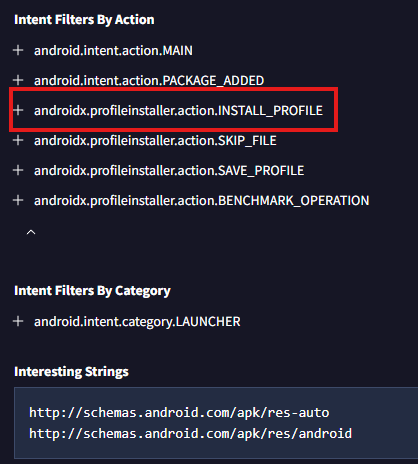
This presented me with a standard Android APK directory structure which include the AndroidManifest.xml below:
<?xml version="1.0" encoding="utf-8"?>
<manifest xmlns:android="http://schemas.android.com/apk/res/android" android:versionCode="1" android:versionName="1.0" android:compileSdkVersion="35" android:compileSdkVersionCodename="15" package="com.bnker.installer" platformBuildVersionCode="35" platformBuildVersionName="15">
    <uses-sdk android:minSdkVersion="27" android:targetSdkVersion="35"/>
    <uses-permission android:name="android.permission.REQUEST_INSTALL_PACKAGES"/>
    <uses-permission android:name="android.permission.QUERY_ALL_PACKAGES"/>
    <uses-permission android:name="android.permission.INTERNET"/>
    <uses-permission android:name="android.permission.ACCESS_NETWORK_STATE"/>
    <permission android:name="com.bnker.installer.DYNAMIC_RECEIVER_NOT_EXPORTED_PERMISSION" android:protectionLevel="signature"/>
    <uses-permission android:name="com.bnker.installer.DYNAMIC_RECEIVER_NOT_EXPORTED_PERMISSION"/>
    <application android:theme="@style/Theme.MyApplication" android:label="@string/app_name" android:icon="@drawable/bgg" android:allowBackup="true" android:supportsRtl="true" android:extractNativeLibs="false" android:appComponentFactory="androidx.core.app.CoreComponentFactory">
        <activity android:name="com.bnker.installer.MainActivity" android:exported="true">
            <intent-filter>
                <action android:name="android.intent.action.MAIN"/>
                <category android:name="android.intent.category.LAUNCHER"/>
            </intent-filter>
        </activity>
        <receiver android:name="com.bnker.installer.PackageReceiver" android:exported="true">
            <intent-filter>
                <action android:name="android.intent.action.PACKAGE_ADDED"/>
                <data android:scheme="package"/>
            </intent-filter>
        </receiver>
        <provider android:name="androidx.core.content.FileProvider" android:exported="false" android:authorities="com.bnker.installer.provider" android:grantUriPermissions="true">
            <meta-data android:name="android.support.FILE_PROVIDER_PATHS" android:resource="@xml/file_paths"/>
        </provider>
        <provider android:name="androidx.startup.InitializationProvider" android:exported="false" android:authorities="com.bnker.installer.androidx-startup">
            <meta-data android:name="androidx.emoji2.text.EmojiCompatInitializer" android:value="androidx.startup"/>
            <meta-data android:name="androidx.lifecycle.ProcessLifecycleInitializer" android:value="androidx.startup"/>
            <meta-data android:name="androidx.profileinstaller.ProfileInstallerInitializer" android:value="androidx.startup"/>
        </provider>
        <receiver android:name="androidx.profileinstaller.ProfileInstallReceiver" android:permission="android.permission.DUMP" android:enabled="true" android:exported="true" android:directBootAware="false">
            <intent-filter>
                <action android:name="androidx.profileinstaller.action.INSTALL_PROFILE"/>
            </intent-filter>
            <intent-filter>
                <action android:name="androidx.profileinstaller.action.SKIP_FILE"/>
            </intent-filter>
            <intent-filter>
                <action android:name="androidx.profileinstaller.action.SAVE_PROFILE"/>
            </intent-filter>
            <intent-filter>
                <action android:name="androidx.profileinstaller.action.BENCHMARK_OPERATION"/>
            </intent-filter>
        </receiver>
    </application>
</manifest>
I converted the classes.dex file using the dex2jar tool, which is a critical step in Android APK analysis. This conversion is necessary because Android applications store their compiled code in .dex (Dalvik Executable) format, which isn’t directly readable.
d2j-dex2jar.sh classes.dex
This conversion transforms the Dalvik bytecode into Java bytecode (.jar file), which can then be analyzed using standard Java decompilers like JADX-GUI, CFR, or Procyon.
For this malware sample, this step was crucial because:
- It allowed us to see the decompiled Java source code
- We could identify the malicious functions targeting banking credentials
- It revealed the Firebase connection strings
- Exposed the SMS interception mechanisms
- Showed the obfuscated strings and their transformations
The resulting .jar file can be opened with JADX-GUI to examine the actual Java source code, making it much easier to understand the malware’s functionality and identify its command and control infrastructure.
After analyzing the decompiled dex code from the banking trojan, I discovered several notable components in the MainActivity implementation. The crucial findings were in the “binker.installer” package, which contains hardcoded cryptographic parameters:
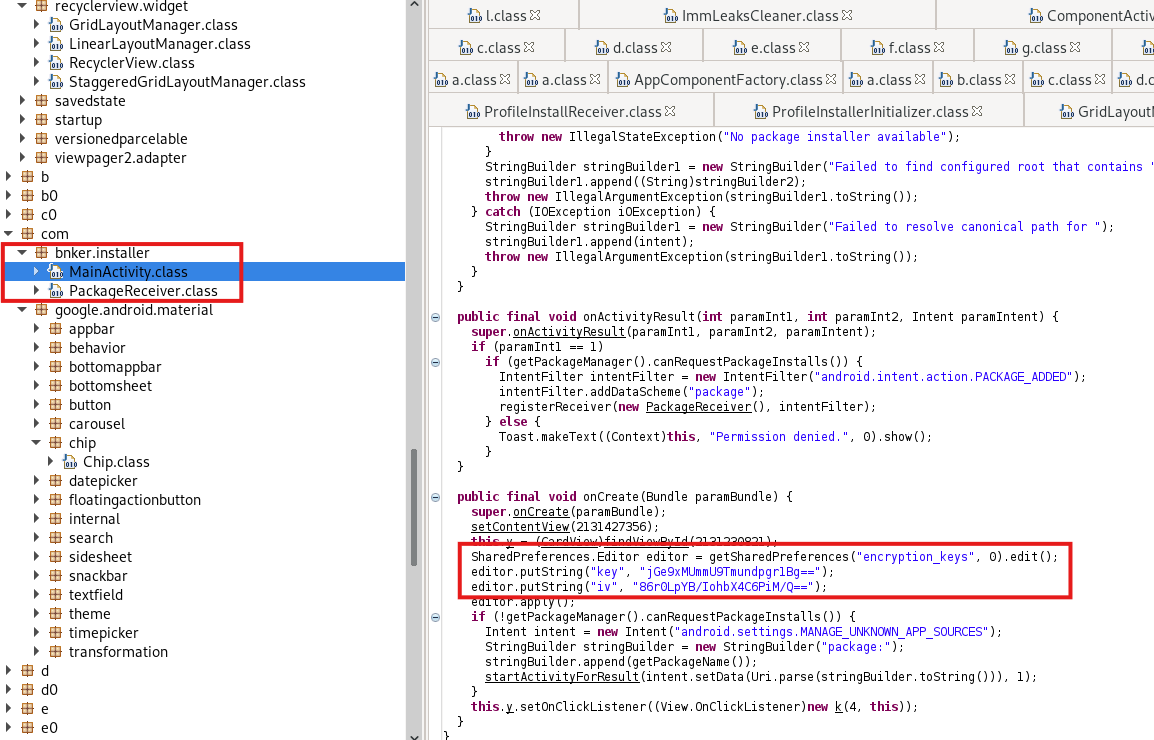
editor.putString("key", "jGe9xMUmmlU9TmundpqrlBg==");
editor.putString("iv", "86rQLpYB/1ohbX4CsFiW/Q==");
These base64-encoded values suggest the malware is using AES encryption, likely in CBC mode given the presence of an IV. The implementation stores these values in SharedPreferences under “encryption_keys”, making them persistently available to the malware.
The package structure also revealed:
- MainActivity.class
- PackageReceiver.class
The PackageReceiver implementation monitors for new package installations, particularly interesting given the presence of:
Intent("android.settings.MANAGE_UNKNOWN_APP_SOURCES")
This indicates the malware attempts to enable installation from unknown sources, likely to facilitate dropping additional payloads.
In my analysis of the decompiled code, I’ve identified a critical mechanism where the malware is accessing a file named “rb” within its assets directory:
InputStream open = mainActivity.getAssets().open("rb");
I uploaded the file to CyberChef and used the previously discovered AES key and IV to decrypt the “RB” file.

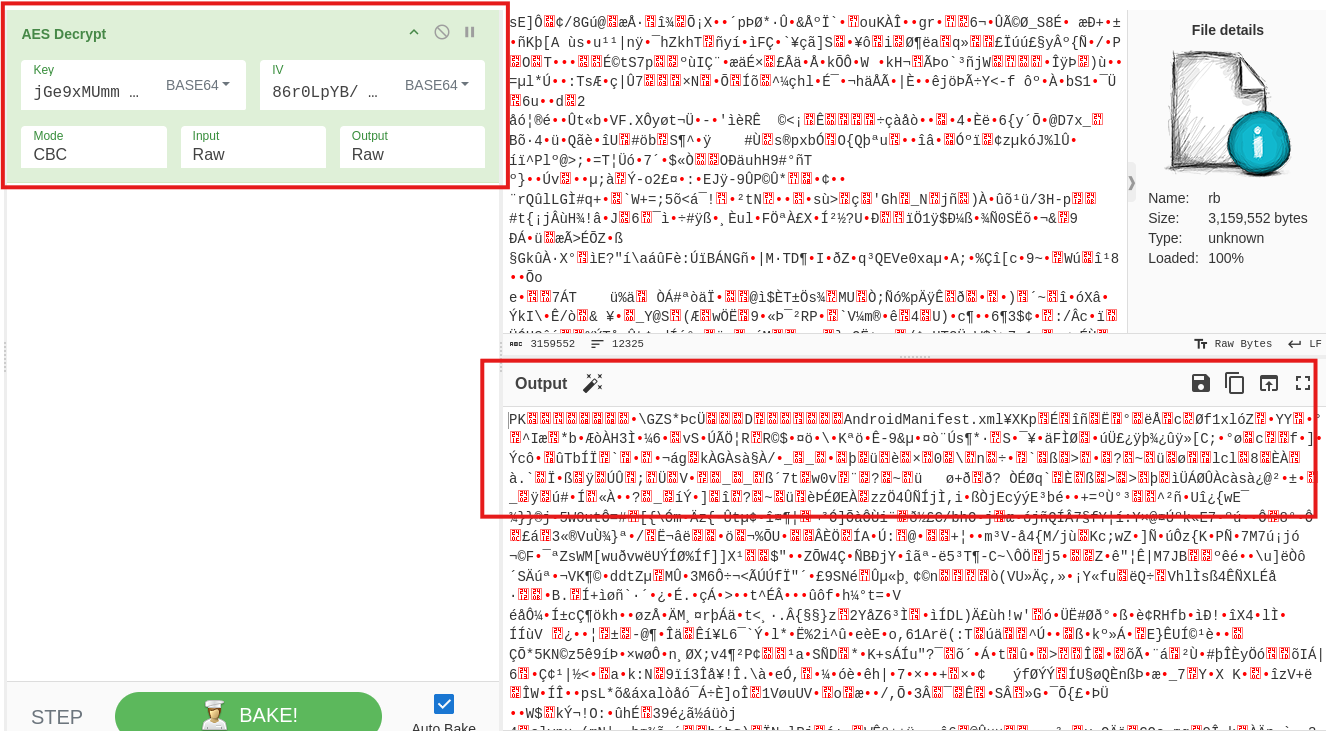
From my analysis of the CyberChef decryption results, I can see that the encrypted “rb” file (3,159,552 bytes) contains what appears to be a ZIP archive header “PK” followed by references to “AndroidManifest.xml”. This suggests the encrypted asset contains a complete APK package or a partial set of APK components. The presence of manifest-related content indicates this could be a secondary payload or overlay package meant to be dynamically loaded by the malware.
Stage 2
I unzipped the file and it prompted me for a password for the AndroidManifest.xml file; however, we did not know the pasword.
Continuing with the analysis, I used dex2jar to extract the classes.dex and classes2.dex.
Within the classes2.dex file contained massive amounts of weird strings that JADX-Gui could not understand and had a hard time deobfuscating:
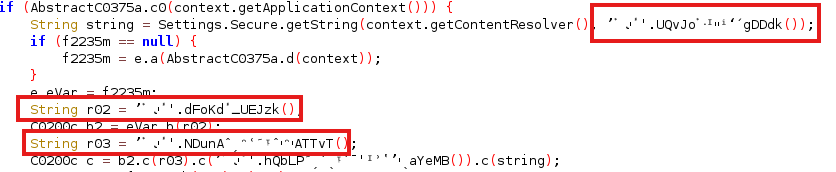
So I utilized CFR to further analyze these now converted .jar files and thank goodness for that tool.
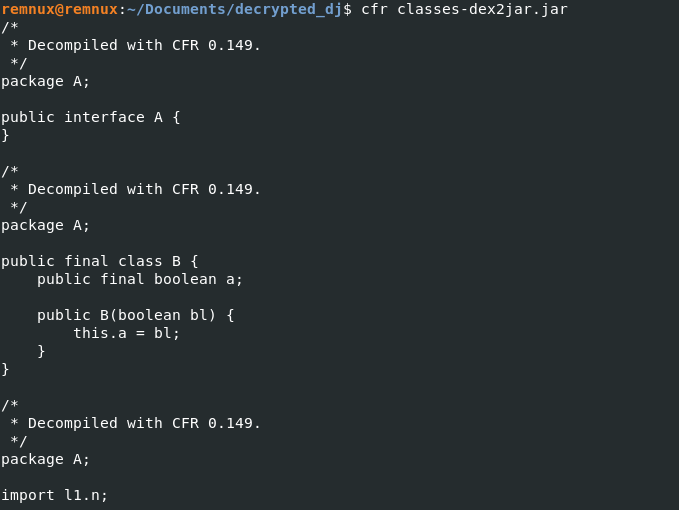
Now came the hard part, gathering all of the substituted code.
First, I created a script to replace function parameters with their assigned string values. This involved carefully parsing Java code to match variable assignments and function calls, allowing me to expose the actual values being passed to obfuscated methods.
public static String doSomeLogic(String str, String str2) {
    byte[] bArr;
    int length = str.length();
    if (length % 2 == 1) {
        length++;
        bArr = new byte[length / 2];
        str = "0" + str;
    } else {
        bArr = new byte[length / 2];
    }
    int i = 0;
    for (int i2 = 0; i2 < length; i2 += 2) {
        bArr[i] = (byte) Integer.parseInt(str.substring(i2, i2 + 2), 16);
        i++;
    }
    byte[] bArr2 = null;
    try {
        SecretKeySpec secretKeySpec = new SecretKeySpec(str2.getBytes(), "AES");
        Cipher cipher = Cipher.getInstance("AES");
        cipher.init(2, secretKeySpec);
        bArr2 = cipher.doFinal(bArr);
    } catch (Exception e) {
        e.printStackTrace();
    }
I then added print statements to function definitions to help me track and log function names. This was crucial for understanding the code’s structure and potential malicious intent.
import re

def replace_function_param_with_value(file_path):
    # Read the Java file
    with open(file_path, 'r', encoding='utf-8') as file:
        content = file.read()

    # Regex pattern to match assignments like: \u1427xQDuo="value";
    assignment_pattern = r'([A-Za-z0-9_\\]+)\s*=\s*"([^"]+)";'

    # Regex pattern to match function calls like: doSomeLogic(\u1427xQDuo,"value");
    function_call_pattern = r'doSomeLogic\(([^,]+),'

    # Store variable assignments in a dictionary
    assignments = {}

    # Find all assignments and store them in the dictionary
    for match in re.finditer(assignment_pattern, content):
        variable = match.group(1)
        value = match.group(2)
        assignments[variable] = value

    # Function to replace the first parameter in the function call with the assigned value
    def replace_param(match):
        param = match.group(1)  # The first parameter
        if param in assignments:
            # Replace the parameter with its assigned value
            return f'doSomeLogic("{assignments[param]}",'
        return match.group(0)  # If no replacement is found, return the original match

    # Perform the replacement in the content
    updated_content = re.sub(function_call_pattern, replace_param, content)

    # Write the updated content back to the file
    with open(file_path, 'w', encoding='utf-8') as file:
        file.write(updated_content)

    print("Replacement complete.")

# Specify the path to your Java file
file_path = 'results2.txt'

# Call the function to replace the first parameter in doSomeLogic function calls
replace_function_param_with_value(file_path)
Once I did that, I added some System.out.println to print out to the screen so I could pipe that to an output file:
import re

def print_function_name_below(file_path):
    # Read the Java file
    with open(file_path, 'r', encoding='utf-8') as file:
        content = file.read()

    # Regex pattern to match function declarations
    function_declaration_pattern = r'([A-Za-z0-9]+(\\[A-Za-z0-9]+)+)\(\)'

    # Function to add print statements below the function definition
    def add_print_function_name(match):
        function_name = match.group(1)
        # Add the print statement below the function definition
        return match.group(0) + f'\n    System.out.println("{function_name}");\n'

    # Perform the replacement in the content
    updated_content = re.sub(function_declaration_pattern, add_print_function_name, content)

    # Write the updated content back to the file
    with open(file_path, 'w', encoding='utf-8') as file:
        file.write(updated_content)

    print("Function name printing complete.")

# Specify the path to your Java file
file_path = 'twoFer.java'

# Call the function to add print statements below the function definitions
print_function_name_below(file_path)
The final script was the most complex - a deobfuscation routine that read through the obfuscated code and substituted encoded method calls with their actual string representations.
import re
import sys

def deobfuscate_code():
    try:
        with open('results.txt', 'r', encoding='utf-8') as file:
            file_content = file.read()

        with open('outputFromJava.txt', 'r', encoding='utf-8') as file:
            printed_map = file.read()

        # Split the content into lines and process
        pattern_map = {}
        lines = printed_map.split('\n')
        i = 0
        while i < len(lines):
            line = lines[i].strip()
            if 'printed:' in line:
                key = line.split('printed:')[0].strip()
                # Get the next line as value
                if i + 1 < len(lines):
                    value = lines[i + 1].strip()
                    pattern_map[key] = value
                i += 2
            else:
                i += 1

        # Process replacements one at a time
        for obfuscated, replacement in pattern_map.items():
            # Instead of trying to decode Unicode, directly search for the pattern
            pattern = 'otherFile\\.[^()]+' + re.escape(obfuscated) + '\\(\\)'
            matches = re.findall(pattern, file_content)
            for match in matches:
                file_content = file_content.replace(match, f'"{replacement}"')

        print(file_content, end='')

    except FileNotFoundError as e:
        print(f"Error: Could not find file - {e}", file=sys.stderr)
        sys.exit(1)
    except Exception as e:
        print(f"An error occurred: {e}", file=sys.stderr)
        sys.exit(1)

if __name__ == "__main__":
    deobfuscate_code()z
This revealed some rather interesting things:
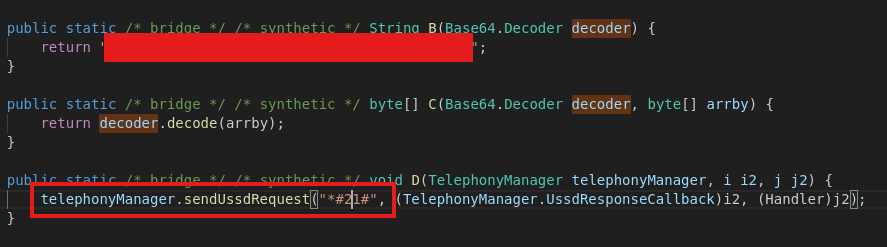
The Android Application will attempt to forward all calls using Android’s TelephonyManager to send a USSD request with the code *#21#, likely related to call forwarding settings, with Base64 decoding methods above it.
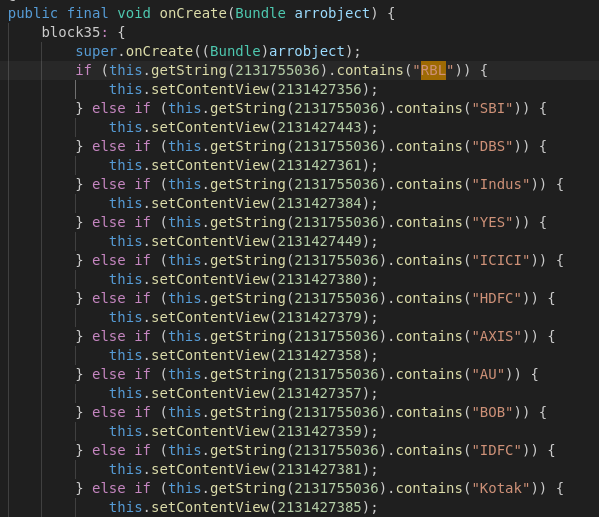
The code revealed that the Android application is designed to detect and mimic multiple Indian bank applications, likely for the purpose of credential theft and financial fraud.
This is a malicious Android application’s constructor method that sets up permissions to send, read, and receive SMS messages, with an additional hint of targeting specific banking systems through the hardcoded string “DJ_BABU/RBL_Admin” which will later reveal a Firebase endpoint.
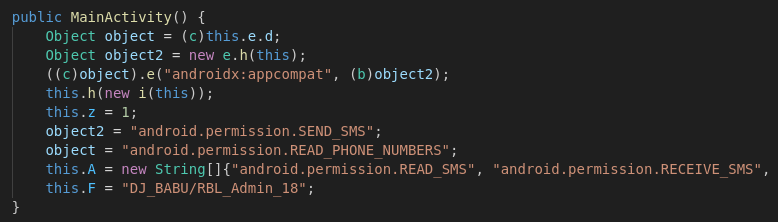
I later noticed a replacement happening within the code.

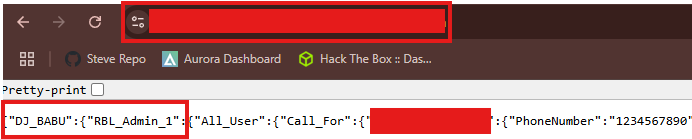
I substituted the values in at the npoint.io API endpont and was able to get keys to a Firebase application.

The Firebase contained all sorts of sensitive information which included:
- Credit Card Information
- SMS Text Messages
- Phone Numbers
- Passwords
Conclusion
After meticulously analyzing this malicious Android application, I reported the comprehensive findings to both nPoint and Google. The malware’s sophisticated design—targeting Indian banking applications, manipulating SMS permissions, and implementing complex obfuscation techniques—represented a significant potential threat to mobile users.
The report included detailed evidence of the application’s malicious capabilities:
- Dynamic bank application interface spoofing
- Unauthorized SMS permission requests
- USSD code manipulation
- Base64 payload decoding
By providing a thorough breakdown to both platforms, I aimed to ensure swift action could be taken to protect potential victims from this insidious piece of mobile malware. The collaborative approach between security researchers and technology platforms remains crucial in combating evolving digital threats.